対話的な設定ファイル作成ツール node-red admin init コマンドでどんなファイルが書き出されるか見てみたメモ

この記事は Node-RED Advent Calendar 2021 の 19 日目の記事です。25 日ごろまで空いてしまったいたので、代打をさせていただきます。
背景
https://www.1ft-seabass.jp/memo/2021/12/01/raspberry-pi-400-with-node-red-and-getting-keycode/
アドベントカレンダー 1 日目で、対話的な設定ファイル作成ツール node-red admin init コマンドを使ってみたんですが、ふと、どんなファイルが書き出されるか運用面で気になったので、調べてみます。
簡単に Node-RED 環境を作る
https://www.1ft-seabass.jp/memo/2021/09/01/node-red-per-launch-project-setting-run-command-static/
こちらの記事をベースに閉じられたプロジェクトフォルダで Node-RED 環境を作りました。Windows 10 です。
Welcome to Node-RED
===================

25 Dec 23:05:33 - [info] Node-RED version: v2.1.4
25 Dec 23:05:33 - [info] Node.js  version: v14.17.5
25 Dec 23:05:33 - [info] Windows_NT 10.0.19042 x64 LE
Node-RED や Node.js のバージョンはこの通りです。結構、新しいはず。
ですので、Node-RED v2.1.4 バージョンの node-red admin init コマンドを実行している状態です。
node-red admin init コマンドを動かしてみる
今回の Node-RED 環境では、フォルダ直下に Node-RED をインストールしたので ./node_modules/.bin/node-red に本体があります。
ですので、
./node_modules/.bin/node-red admin initこのように実行しました。これでバッチリ実行できました。
実際の設定の流れ
設定したログはこのようになっています。
Node-RED Settings File initialisation
=====================================
This tool will help you create a Node-RED settings file.

√ Settings file · **********\node-red-command-test-sample\node-red_dir\settings.js
√ That file already exists. Are you sure you want to overwrite it? · Yes

User Security
=============
√ Do you want to setup user security? · Yes
√ Username · admin
√ Password · *********
√ User permissions · full access
√ Add another user? · No

Projects
========
The Projects feature allows you to version control your flow using a local git repository.

√ Do you want to enable the Projects feature? · No

Flow File settings
==================
√ Enter a name for your flows file · flows.json
√ Provide a passphrase to encrypt your credentials file ·

Editor settings
===============
√ Select a theme for the editor. To use any theme other than "default", you will need to install @node-red-contrib-themes/theme-collection in your Node-RED user directory. · default
√ Select the text editor component to use in the Node-RED Editor · ace (default)

Node settings
=============
√ Allow Function nodes to load external modules? (functionExternalModules) · Yes
**********\node-red-command-test-sample\node-red_dir\settings.js は、伏字になってますが、実際にはこの Node-RED 環境のある設定ファイルの位置です。
パス指定をしないと、グローバル実行する Node-RED で使われる設定ファイルが指定されるので、こういったケースでは慎重に対象の設定ファイルを指定しましょう。
動かしてみて設定ファイルはどうなったか
まず、元々 setting.js 設定ファイルは存在していたのですが、That file already exists. Are you sure you want to overwrite it? の警告の通り、上書きされます。(これは、もちろんOK)
出来上がったファイルはというと、最初の行あたりの抜粋ですが、以下のように、しっかりコメント付きの設定ファイルで書き出されてました!すごい!
/**
 * Node-RED Settings created at Sat, 25 Dec 2021 14:08:48 GMT
 *
 * It can contain any valid JavaScript code that will get run when Node-RED
 * is started.
 *
 * Lines that start with // are commented out.
 * Each entry should be separated from the entries above and below by a comma ','
 *
 * For more information about individual settings, refer to the documentation:
 *    https://nodered.org/docs/user-guide/runtime/configuration
 *
 * The settings are split into the following sections:
 *  - Flow File and User Directory Settings
 *  - Security
 *  - Server Settings
 *  - Runtime Settings
 *  - Editor Settings
 *  - Node Settings
 *
 **/

module.exports = {

/*******************************************************************************
 * Flow File and User Directory Settings
 *  - flowFile
 *  - credentialSecret
 *  - flowFilePretty
 *  - userDir
 *  - nodesDir
 ******************************************************************************/

    /** The file containing the flows. If not set, defaults to flows_<hostname>.json **/
    flowFile: "flows.json",

    /** By default, credentials are encrypted in storage using a generated key. To
     * specify your own secret, set the following property.
     * If you want to disable encryption of credentials, set this property to false.
     * Note: once you set this property, do not change it - doing so will prevent
     * node-red from being able to decrypt your existing credentials and they will be
     * lost.
     */
    credentialSecret: false,

    /** By default, the flow JSON will be formatted over multiple lines making
     * it easier to compare changes when using version control.
     * To disable pretty-printing of the JSON set the following property to false.
     */
    flowFilePretty: true,

    /** By default, all user data is stored in a directory called `.node-red` under
     * the user's home directory. To use a different location, the following
     * property can be used
     */
    //userDir: '/home/nol/.node-red/',

    /** Node-RED scans the `nodes` directory in the userDir to find local node files.
     * The following property can be used to specify an additional directory to scan.
     */
    //nodesDir: '/home/nol/.node-red/nodes',
そして、一番気になっていたログイン ID とパスワードを付与する設定をした adminAuth の箇所です。
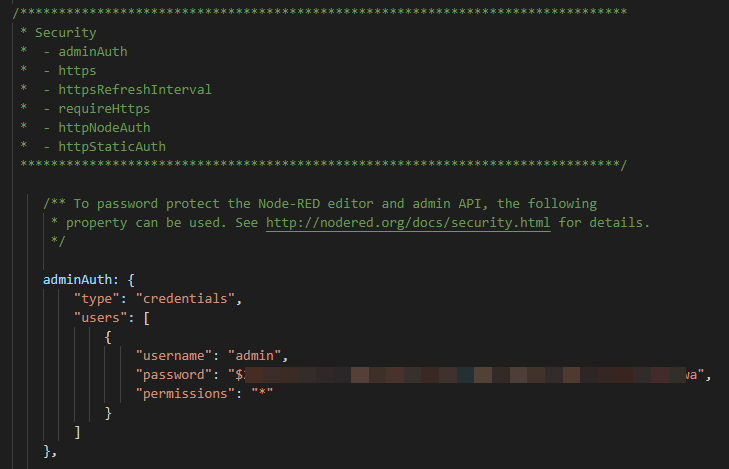
ちゃんと、手動で設定するときと同じよう暗号化されている状態で設定されていました!
なるほど分かりやすい。
どうやら、設定ファイルのテンプレートのようなものがあり書き換えてる様子
どういう挙動になっているかなと思い 2021/12/25 時点のソースで
- https://github.com/node-red/node-red-admin/blob/master/lib/commands/init/index.js
- https://github.com/node-red/node-red-admin/blob/master/lib/commands/init/resources/settings.js.mustache
node-red-admin のリポジトリを見てみたところ、こちらの index.js が対話的なコマンドメインを担当し、実際にせて地したものを settings.js.mustache という設定ファイルのテンプレートをベースにして、設定されたものを置き換えているようです。
だから、adminAuth のような設定でも、きれいに置き換わっていたんですね。すごい。
うまく使うと、自分の設定ファイルにマージもできそう
自分でカスタマイズした設定ファイルがあるとして、ただただ上書きは困るのはあるんですが、とはいっても、ログイン ID・パスワードのようなベースとなる設定が、この対話的コマンドで簡単に設定できると言うのはありがたいので、たとえば、別ファイルとして、この対話的コマンドで仮の設定ファイルを書き出したあとに、自分でカスタマイズした設定ファイルに、マージできるようなスクリプトが書ければ、より良い運用ができるような気がしました!
いやー、ちゃんと、挙動を見るって楽しいですね!よいエクササイズになりました。