2025 年 4 月時点 Node-RED からローカルのステートフル MCP サーバーと連携するメモ

2025 年 4 月時点 Node-RED からローカルのステートフル MCP サーバーと連携するメモです。
背景
あくまで2025 年 4 月時点の仕様での試してみたお話です。ここから仕様が変わったりより良いアプローチが見つかるかもしれません。
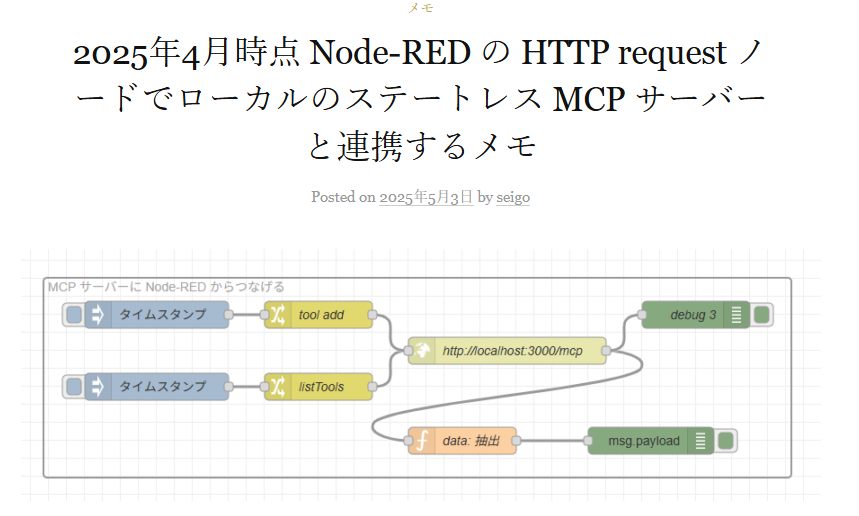
2025年4月時点 Node-RED の HTTP request ノードでローカルのステートレス MCP サーバーと連携するメモ がうまくいったので、公式のステートフル MCP サーバーとつないでみます。
MCP ステートレスサーバーを TypeScript つくる
こちらは、あえて Node-RED でつくりません。今回はあくまで別のところにある MCP サーバーへアクセスするかという観点で進めます。
モジュールのインストール
こちらをもとに、
npm install @modelcontextprotocol/sdk zod expressと
npm install -D typescript ts-node @types/node @types/expressを実行してモジュールの準備をします。
package.json に "type": "module" 加える
{
  "name": "red-mcp-test",
  "version": "1.0.0",
  "main": "index.js",
  "type": "module",
  "scripts": {
    "test": "echo \"Error: no test specified\" && exit 1"
  },
  "keywords": [],
  "author": "",
  "license": "ISC",
  "description": "",
  "dependencies": {
    "@modelcontextprotocol/sdk": "^1.11.0",
    "express": "^5.1.0",
    "zod": "^3.24.3"
  },
  "devDependencies": {
    "@types/express": "^5.0.1",
    "@types/node": "^22.15.3",
    "ts-node": "^10.9.2",
    "typescript": "^5.8.3"
  }
}
package.json はこんな構成です。
"type": "module" を加えます。
server-statefull.ts 用意
こちらの記事の With Session Management のソースを元に、足し算のツールを加えたものを server-statefull.ts で用意します。
import express from "express";
import { randomUUID } from "node:crypto";
import { McpServer } from "@modelcontextprotocol/sdk/server/mcp.js";
import { StreamableHTTPServerTransport } from "@modelcontextprotocol/sdk/server/streamableHttp.js";
import { isInitializeRequest } from "@modelcontextprotocol/sdk/types.js"

import { z } from "zod";

const app = express();
app.use(express.json());

// Map to store transports by session ID
const transports: { [sessionId: string]: StreamableHTTPServerTransport } = {};

const server = new McpServer({
  name: "example-server",
  version: "1.0.0"
});

// 足し算ツール
server.tool(
  "add",
  "足し算ツール",
  { a: z.number(), b: z.number() },
  async ({ a, b }) => ({
    content: [{ type: "text", text: String(a + b) }]
  })
);

// Handle POST requests for client-to-server communication
app.post('/mcp', async (req, res) => {
  console.log(req.body);
  // Check for existing session ID
  const sessionId = req.headers['mcp-session-id'] as string | undefined;
  let transport: StreamableHTTPServerTransport;

  if (sessionId && transports[sessionId]) {
    // Reuse existing transport
    transport = transports[sessionId];
  } else if (!sessionId && isInitializeRequest(req.body)) {
    // New initialization request
    transport = new StreamableHTTPServerTransport({
      sessionIdGenerator: () => randomUUID(),
      onsessioninitialized: (sessionId) => {
        // Store the transport by session ID
        transports[sessionId] = transport;
      }
    });

    // Clean up transport when closed
    transport.onclose = () => {
      if (transport.sessionId) {
        delete transports[transport.sessionId];
      }
    };

    // Connect to the MCP server
    await server.connect(transport);

  } else {
    // Invalid request
    res.status(400).json({
      jsonrpc: '2.0',
      error: {
        code: -32000,
        message: 'Bad Request: No valid session ID provided',
      },
      id: null,
    });
    return;
  }

  // Handle the request
  await transport.handleRequest(req, res, req.body);
});

// Reusable handler for GET and DELETE requests
const handleSessionRequest = async (req: express.Request, res: express.Response) => {
  const sessionId = req.headers['mcp-session-id'] as string | undefined;
  if (!sessionId || !transports[sessionId]) {
    res.status(400).send('Invalid or missing session ID');
    return;
  }

  const transport = transports[sessionId];
  await transport.handleRequest(req, res);
};

// Handle GET requests for server-to-client notifications via SSE
app.get('/mcp', handleSessionRequest);

// Handle DELETE requests for session termination
app.delete('/mcp', handleSessionRequest);

app.listen(3000);
tsconfig.json
tsconfig.json も準備して、この後、TypeScript を動かす設定もしておきます。
{
  "compilerOptions": {
    "target": "ES2020",
    "module": "ESNext",
    "moduleResolution": "node",
    "esModuleInterop": true,
    "types": ["node"],
    "strict": true
  },
  "include": ["**/*.ts"]
}
server-statefull.ts 実行
こちらを
node --loader ts-node/esm server-statefull.tsで TypeScript 実行します。これで localhost:3000/mcp のエンドポイントからアクセスできます。
Node-RED からアクセスしてみる
Node-REDからアクセスしてみます。
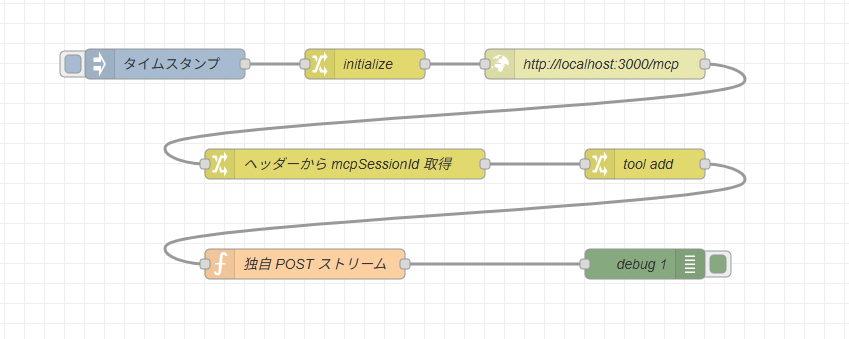
こんなフローです。

この部分が、まずストリームにつなぐ初期化部分で /mcp に POST リクエストしてセッション ID を取得する部分です。
initialize の change ノードは以下のようになっています。
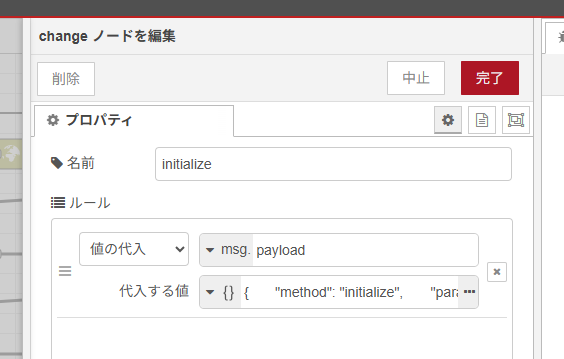
{
    "method": "initialize",
    "params": {
        "protocolVersion": "2025-03-26",
        "capabilities": {},
        "clientInfo": {
            "name": "example-client",
            "version": "0.0.1"
        }
    },
    "jsonrpc": "2.0",
    "id": 0
}
このように JSON の initialize 用の値を作っています。

initialize のときは、まだストリームではなく単純な HTTP POST リクエストなので http request ノードを使います。
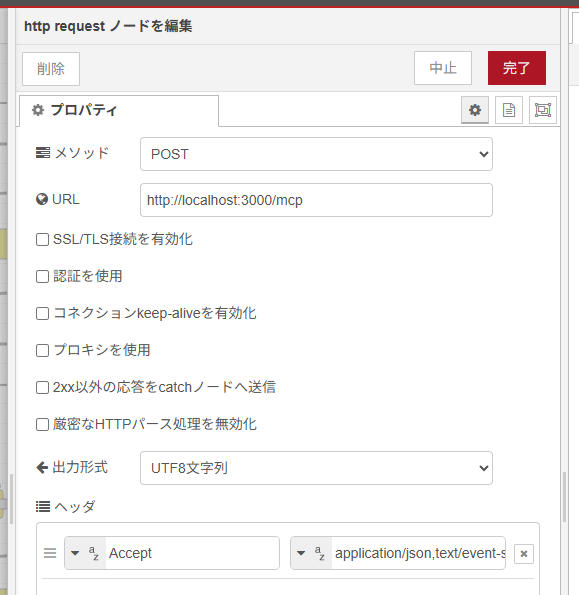
URL 以外の設定といえば Accept ヘッダーで application/json,text/event-stream にして送っています。
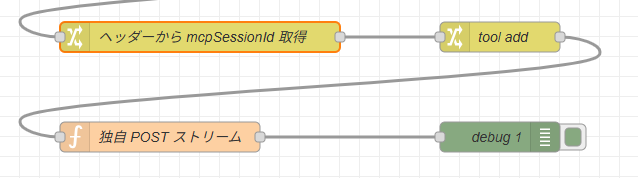
つづいていよいよセッション ID を保持しつつ、それを元にデータをやり取りする流れがこちらです。

ヘッダーから mcpSessionId 取得の change ノードはこのようになっています。
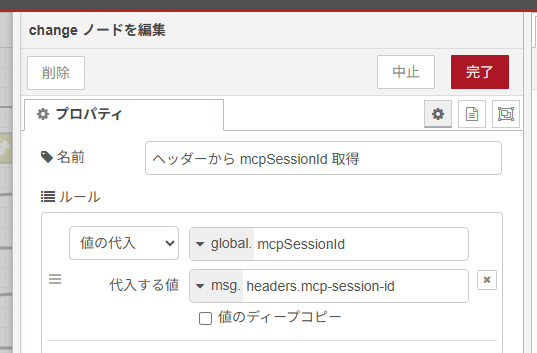
ヘッダーに mcp-session-id があるのでこれをグローバル変数で保持します。
実際に足し算を5+6でさせる JSON をつくる change ノードです。
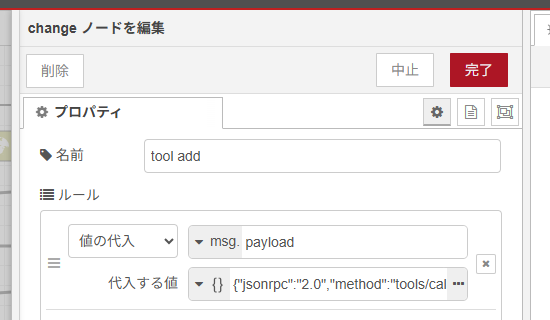
これが中身です。
{
    "jsonrpc": "2.0",
    "method": "tools/call",
    "params": {
        "name": "add",
        "arguments": {
            "a": 5,
            "b": 6
        }
    },
    "id": 1
}
ステートレスの時と同じですね。
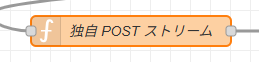
ここが今回の大事な部分 POST で HTTP ストリーミングをするという function ノードです。 GET で HTTP ストリーミングするなら EventSource モジュールとか使えるみたいなのですが、今回のステートフルサンプルだと POST リクエストで行いますし MCP としてのやりとりが加わるので、独自で組むことにしました。
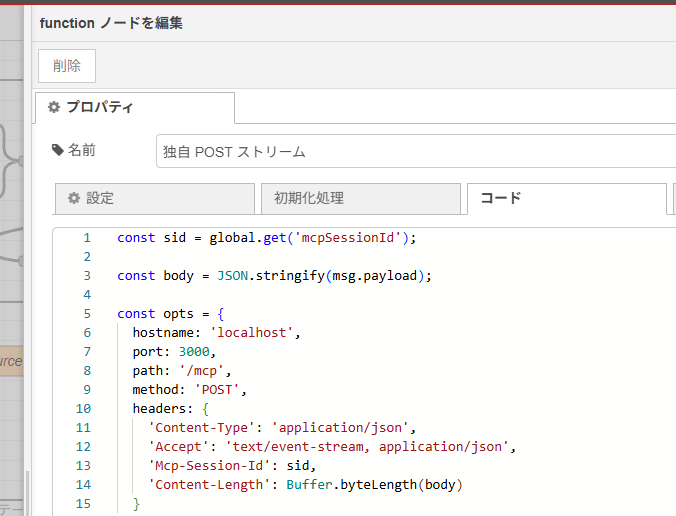
これが中身です。
const sid = global.get('mcpSessionId');

const body = JSON.stringify(msg.payload);

const opts = {
  hostname: 'localhost',
  port: 3000,
  path: '/mcp',
  method: 'POST',
  headers: {
    'Content-Type': 'application/json',
    'Accept': 'text/event-stream, application/json',
    'Mcp-Session-Id': sid,
    'Content-Length': Buffer.byteLength(body)
  }
};

let buffer = '';
const req = http.request(opts, res => {
  if (res.statusCode < 200 || res.statusCode >= 300) {
    node.error(`非2xxレスポンス: ${res.statusCode}`);
    return;
  }
  // node.warn(`接続成功 (status: ${res.statusCode})`);

  res.on('data', chunk => {
    buffer = chunk.toString()
  });
  res.on('end', () => {
    // node.warn('ストリーム終了');
    // node.warn(buffer);
    // "event: message\ndata: {...}\n\n" 全体を分割
    buffer.split(/\r?\n/).forEach(ev => {
      if (ev.startsWith('data:')) {
        try {
          const json = JSON.parse(ev.replace(/^data:\s*/, ''));
          // msg.payload に伝達
          node.send({ payload: json });
        } catch (e) {
          node.warn('JSON parse failed: ' + e);
        }
      }
    });
  });

});

req.on('error', err => node.error('HTTPエラー: ' + err));
req.write(body);
req.end();

// 再デプロイ時に abort できるように保存しておく
context.set('req', req);

return null;
こんなコードです。おもに http モジュールでチャンクでデータを待つところや、Mcp-Session-Id をヘッダーに入れるところが大事でした。
以下がフロー JSON です。
[{"id":"2e47fa9732269fe0","type":"function","z":"27acd4cd6bc83a79","name":"独自 POST ストリーム","func":"const sid = global.get('mcpSessionId');\n\nconst body = JSON.stringify(msg.payload);\n\nconst opts = {\n hostname: 'localhost',\n port: 3000,\n path: '/mcp',\n method: 'POST',\n headers: {\n 'Content-Type': 'application/json',\n 'Accept': 'text/event-stream, application/json',\n 'Mcp-Session-Id': sid,\n 'Content-Length': Buffer.byteLength(body)\n }\n};\n\nlet buffer = '';\nconst req = http.request(opts, res => {\n if (res.statusCode < 200 || res.statusCode >= 300) {\n node.error(`非2xxレスポンス: ${res.statusCode}`);\n return;\n }\n // node.warn(`接続成功 (status: ${res.statusCode})`);\n\n res.on('data', chunk => {\n buffer = chunk.toString()\n });\n res.on('end', () => {\n // node.warn('ストリーム終了');\n // node.warn(buffer);\n // \"event: message\\ndata: {...}\\n\\n\" 全体を分割\n buffer.split(/\\r?\\n/).forEach(ev => {\n if (ev.startsWith('data:')) {\n try {\n const json = JSON.parse(ev.replace(/^data:\\s*/, ''));\n // msg.payload に伝達\n node.send({ payload: json });\n } catch (e) {\n node.warn('JSON parse failed: ' + e);\n }\n }\n });\n });\n\n});\n\nreq.on('error', err => node.error('HTTPエラー: ' + err));\nreq.write(body);\nreq.end();\n\n// 再デプロイ時に abort できるように保存しておく\ncontext.set('req', req);\n\nreturn null;\n","outputs":1,"timeout":0,"noerr":0,"initialize":"","finalize":"","libs":[{"var":"eventsource","module":"eventsource"},{"var":"http","module":"http"}],"x":740,"y":1060,"wires":[["11c263ce9fe67058"]]},{"id":"9998fdec58a5fcd9","type":"change","z":"27acd4cd6bc83a79","name":"initialize","rules":[{"t":"set","p":"payload","pt":"msg","to":"{\"method\":\"initialize\",\"params\":{\"protocolVersion\":\"2025-03-26\",\"capabilities\":{},\"clientInfo\":{\"name\":\"example-client\",\"version\":\"0.0.1\"}},\"jsonrpc\":\"2.0\",\"id\":0}","tot":"json"}],"action":"","property":"","from":"","to":"","reg":false,"x":800,"y":860,"wires":[["9f1065473e2060f7"]]},{"id":"9f1065473e2060f7","type":"http request","z":"27acd4cd6bc83a79","name":"http://localhost:3000/mcp","method":"POST","ret":"txt","paytoqs":"ignore","url":"http://localhost:3000/mcp","tls":"","persist":false,"proxy":"","insecureHTTPParser":false,"authType":"","senderr":false,"headers":[{"keyType":"other","keyValue":"Accept","valueType":"other","valueValue":"application/json,text/event-stream"}],"x":1030,"y":860,"wires":[["f9da01e9b363dddb"]]},{"id":"362fafaaed3c1ca5","type":"inject","z":"27acd4cd6bc83a79","name":"","props":[{"p":"payload"},{"p":"topic","vt":"str"}],"repeat":"","crontab":"","once":false,"onceDelay":0.1,"topic":"","payload":"","payloadType":"date","x":600,"y":860,"wires":[["9998fdec58a5fcd9"]]},{"id":"f9da01e9b363dddb","type":"change","z":"27acd4cd6bc83a79","name":"ヘッダーから mcpSessionId 取得","rules":[{"t":"set","p":"mcpSessionId","pt":"global","to":"headers.mcp-session-id","tot":"msg"}],"action":"","property":"","from":"","to":"","reg":false,"x":780,"y":960,"wires":[["6f75db0eb87b2167"]]},{"id":"11c263ce9fe67058","type":"debug","z":"27acd4cd6bc83a79","name":"debug 1","active":true,"tosidebar":true,"console":false,"tostatus":false,"complete":"payload","targetType":"msg","statusVal":"","statusType":"auto","x":1080,"y":1060,"wires":[]},{"id":"6f75db0eb87b2167","type":"change","z":"27acd4cd6bc83a79","name":"tool add","rules":[{"t":"set","p":"payload","pt":"msg","to":"{\"jsonrpc\":\"2.0\",\"method\":\"tools/call\",\"params\":{\"name\":\"add\",\"arguments\":{\"a\":5,\"b\":6}},\"id\":1}","tot":"json"}],"action":"","property":"","from":"","to":"","reg":false,"x":1080,"y":960,"wires":[["2e47fa9732269fe0"]]}]動かしてみる

こちらの inject ノードをクリックして、実行してみます。initialize でセッション ID を受け取って、それを元に実際に足し算を5+6でさせるやり取りをしします。
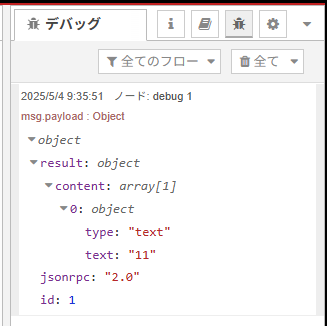
このように足し算結果が受け取れました!

server-statefull.ts サーバーのほうでもちゃんとデータの受け取りが確認でき、処理が行われていることが分かりました。