2025年4月時点 Node-RED の HTTP request ノードでローカルのステートレス MCP サーバーと連携するメモ
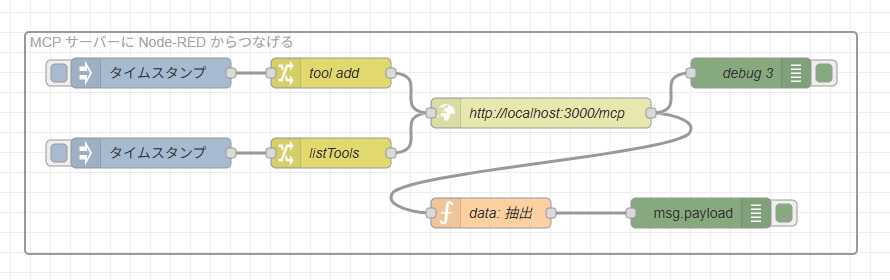
2025年4月時点 Node-RED の HTTP request ノードでローカルのステートレス MCP サーバーと連携するメモです。
背景
あくまで2025年4月時点の仕様での試してみたお話です。ここから仕様が変わったりより良いアプローチが見つかるかもしれません。
MCP サーバーも stdio 方式が慣れてきたので HTTP ストリーミング方式にも足を延ばしつつあります。いろいろのたうち回りながらですが、ひとまず、StreamableHTTPServerTransport クラスを TypeScrip で使いつつも、まずはシンプルにステートレスな HTTP サーバーで Node-RED の HTTP request ノードとやりとりできたました。
セッションがあり会話を記録できる本来のステートフルの実装については Node-RED の HTTP request ノードではストリーム的なものが標準ではできないので text/event-stream とやりとり可能なライブラリが必要っぽいので、これはステートレスが落ち着いたら深く調べてみる予定です。
ChatGPT と並走していましたが、やはり最新めの技術にいくら文献読み込みを保持しても、一緒にのたうち回る感じになってしまいましたが、考えをすっきりさせるときに azukiazusa さんの MCP サーバーの Streamable HTTP transport を試してみる にとても助けになりました。ありがとうございます。
MCP ステートレスサーバーをつくる
こちらは、あえて Node-RED でつくりません。TypeScript SDK があるので、作れなくはなさそうですけど、今回はあくまで別のところにある MCP サーバーへアクセスするかという観点で進めます。
モジュールのインストール
こちらをもとに、
npm install @modelcontextprotocol/sdk zod expressと
npm install -D typescript ts-node @types/node @types/expressを実行してモジュールの準備をします。
package.json に "type": "module" 加える
{
  "name": "red-mcp-test",
  "version": "1.0.0",
  "main": "index.js",
  "type": "module",
  "scripts": {
    "test": "echo \"Error: no test specified\" && exit 1"
  },
  "keywords": [],
  "author": "",
  "license": "ISC",
  "description": "",
  "dependencies": {
    "@modelcontextprotocol/sdk": "^1.11.0",
    "express": "^5.1.0",
    "zod": "^3.24.3"
  },
  "devDependencies": {
    "@types/express": "^5.0.1",
    "@types/node": "^22.15.3",
    "ts-node": "^10.9.2",
    "typescript": "^5.8.3"
  }
}
package.json はこんな構成です。
"type": "module" を加えます。
server.ts 用意
こちらの記事の Without Session Management (Stateless) のソースを元に、足し算のツールを加えたものを server.ts で用意します。
import { McpServer } from "@modelcontextprotocol/sdk/server/mcp.js";
import { StreamableHTTPServerTransport } from "@modelcontextprotocol/sdk/server/streamableHttp.js";
import { z } from "zod";
import express from "express";

const app = express();
app.use(express.json());

const server = new McpServer({
  name: "example-server",
  version: "1.0.0"
});

// 足し算ツール
server.tool(
  "add",
  "足し算ツール",
  { a: z.number(), b: z.number() },
  async ({ a, b }) => ({
    content: [{ type: "text", text: String(a + b) }]
  })
);

app.post('/mcp', async (req, res) => {
  // In stateless mode, create a new instance of transport and server for each request
  // to ensure complete isolation. A single instance would cause request ID collisions
  // when multiple clients connect concurrently.

  try {
    const transport: StreamableHTTPServerTransport = new StreamableHTTPServerTransport({
      sessionIdGenerator: undefined,
    });
    res.on('close', () => {
      console.log('Request closed');
      transport.close();
      server.close();
    });
    await server.connect(transport);
    await transport.handleRequest(req, res, req.body);
  } catch (error) {
    console.error('Error handling MCP request:', error);
    if (!res.headersSent) {
      res.status(500).json({
        jsonrpc: '2.0',
        error: {
          code: -32603,
          message: 'Internal server error',
        },
        id: null,
      });
    }
  }
});

app.get('/mcp', async (req, res) => {
  console.log('Received GET MCP request');
  res.writeHead(405).end(JSON.stringify({
    jsonrpc: "2.0",
    error: {
      code: -32000,
      message: "Method not allowed."
    },
    id: null
  }));
});

app.delete('/mcp', async (req, res) => {
  console.log('Received DELETE MCP request');
  res.writeHead(405).end(JSON.stringify({
    jsonrpc: "2.0",
    error: {
      code: -32000,
      message: "Method not allowed."
    },
    id: null
  }));
});


// Start the server
const PORT = 3000;
app.listen(PORT, () => {
  console.log(`MCP Stateless Streamable HTTP Server listening on port ${PORT}`);
});
tsconfig.json
tsconfig.json も準備して、この後、TypeScript を動かす設定もしておきます。
{
  "compilerOptions": {
    "target": "ES2020",
    "module": "ESNext",
    "moduleResolution": "node",
    "esModuleInterop": true,
    "types": ["node"],
    "strict": true
  },
  "include": ["**/*.ts"]
}
server.ts 実行
こちらを
node --loader ts-node/esm server.tsで TypeScript 実行します。
MCP Stateless Streamable HTTP Server listening on port 3000
と出て、 localhost:3000/mcp のエンドポイントからアクセスできます。
REST Client
curl っぽくアクセスできる VSCode の便利ツール REST Client でアクセスしてみます。
### ツール一覧
POST http://localhost:3000/mcp
Content-Type: application/json
Accept: application/json,text/event-stream

{"jsonrpc":"2.0","method":"tools/list","params":{},"id":2}
でツール一覧が取得でき、
HTTP/1.1 200 OK
X-Powered-By: Express
Content-Type: text/event-stream
Cache-Control: no-cache
Connection: keep-alive
Date: Sat, 03 May 2025 06:13:59 GMT
Transfer-Encoding: chunked

event: message
data: {"result":{"tools":[{"name":"add","description":"足し算ツール","inputSchema":{"type":"object","properties":{"a":{"type":"number"},"b":{"type":"number"}},"required":["a","b"],"additionalProperties":false,"$schema":"http://json-schema.org/draft-07/schema#"}}]},"jsonrpc":"2.0","id":2}
というレスポンスが返ってきます。
### 足し算ツール add を 5+6 で実行
POST http://localhost:3000/mcp
Content-Type: application/json
Accept: application/json,text/event-stream

{"jsonrpc":"2.0","method":"tools/call","params":{"name":"add","arguments":{"a":5,"b":6}},"id":1}
で足し算ツール add を 5+6 で実行でき、
HTTP/1.1 200 OK
X-Powered-By: Express
Content-Type: text/event-stream
Cache-Control: no-cache
Connection: keep-alive
Date: Sat, 03 May 2025 06:14:46 GMT
Transfer-Encoding: chunked

event: message
data: {"result":{"content":[{"type":"text","text":"11"}]},"jsonrpc":"2.0","id":1}
というレスポンスが返ってきます。JSON ではなく event: と data: という独自?フォーマットの中にデータがあるのが、ちょっと癖ですがなんとかなりそうです。
Node-RED からアクセスしてみる
これをもとにアクセスしてみます。

こんなフローです。
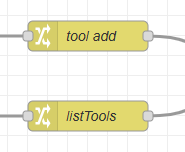
データの元となる change ノードの中身は、
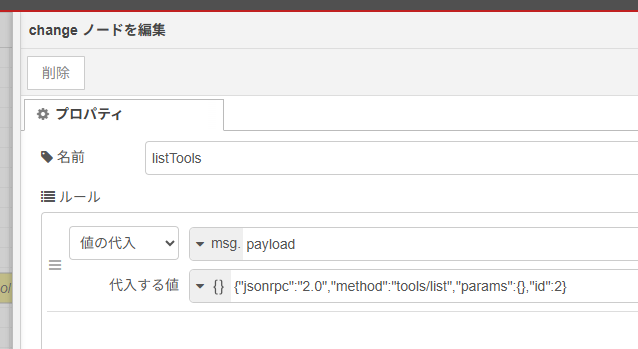
たとえばツール一覧はこのようになっています。
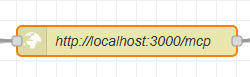
http request ノードについては、
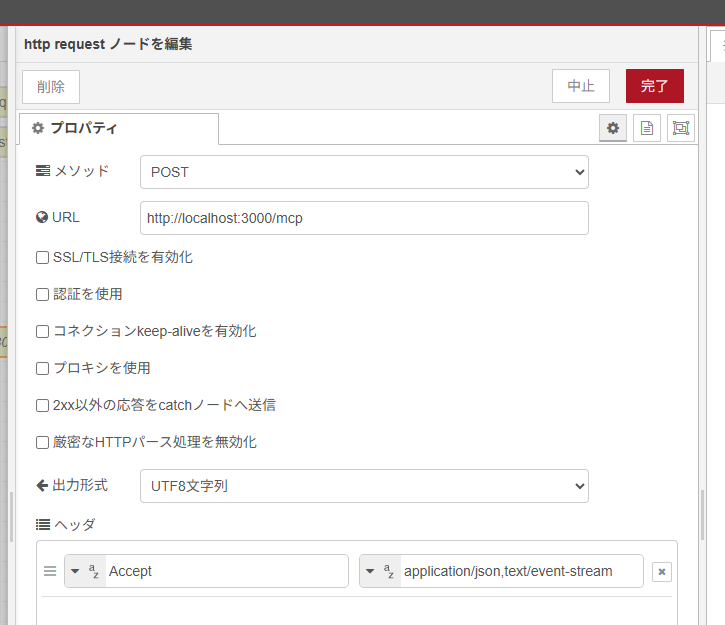
Accept ヘッダーを application/json,text/event-stream にしないと、
"{"jsonrpc":"2.0","error":{"code":-32000,"message":"Not Acceptable: Client must accept both application/json and text/event-stream"},"id":null}"といったエラーが出るので対策してます。
「data: 抽出」を行う function ノードは、
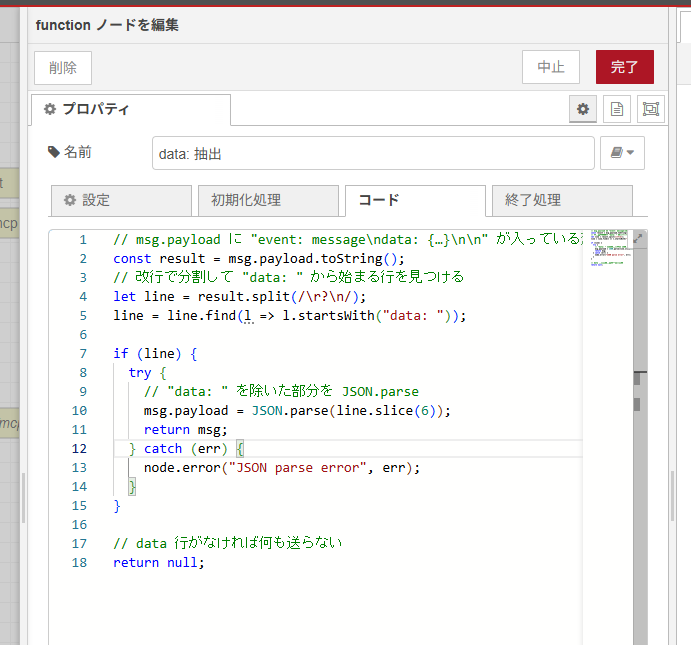
となっていて、
// msg.payload に "event: message\ndata: {…}\n\n" が入っている想定
const result = msg.payload.toString();
// 改行で分割して "data: " から始まる行を見つける
let line = result.split(/\r?\n/);
line = line.find(l => l.startsWith("data: "));

if (line) {
  try {
    // "data: " を除いた部分を JSON.parse
    msg.payload = JSON.parse(line.slice(6));
    return msg;
  } catch (err) {
    node.error("JSON parse error", err);
  }
}

// data 行がなければ何も送らない
return null;
data: から JSON が取り出せるようにしています。
以下がフロー JSON です。
[{"id":"475f91cc6f4dd5d4","type":"http request","z":"27acd4cd6bc83a79","name":"http://localhost:3000/mcp","method":"POST","ret":"txt","paytoqs":"ignore","url":"http://localhost:3000/mcp","tls":"","persist":false,"proxy":"","insecureHTTPParser":false,"authType":"","senderr":false,"headers":[{"keyType":"other","keyValue":"Accept","valueType":"other","valueValue":"application/json,text/event-stream"}],"x":690,"y":380,"wires":[["19d1748aed0d8da8","db2755b7cd28527a"]]},{"id":"66278aa997210515","type":"debug","z":"27acd4cd6bc83a79","name":"","active":true,"tosidebar":true,"console":false,"tostatus":false,"complete":"payload","targetType":"msg","statusVal":"","statusType":"auto","x":1130,"y":380,"wires":[]},{"id":"693815d25407d174","type":"inject","z":"27acd4cd6bc83a79","name":"","props":[{"p":"payload"},{"p":"topic","vt":"str"}],"repeat":"","crontab":"","once":false,"onceDelay":0.1,"topic":"","payload":"","payloadType":"date","x":220,"y":420,"wires":[["4c6da7a30bbfdf68"]]},{"id":"4c6da7a30bbfdf68","type":"change","z":"27acd4cd6bc83a79","name":"listTools","rules":[{"t":"set","p":"payload","pt":"msg","to":"{\"jsonrpc\":\"2.0\",\"method\":\"tools/list\",\"params\":{},\"id\":2}","tot":"json"}],"action":"","property":"","from":"","to":"","reg":false,"x":400,"y":420,"wires":[["475f91cc6f4dd5d4"]]},{"id":"dcf7c4e31058b4f2","type":"change","z":"27acd4cd6bc83a79","name":"tool add","rules":[{"t":"set","p":"payload","pt":"msg","to":"{\"jsonrpc\":\"2.0\",\"method\":\"tools/call\",\"params\":{\"name\":\"add\",\"arguments\":{\"a\":5,\"b\":6}},\"id\":1}","tot":"json"}],"action":"","property":"","from":"","to":"","reg":false,"x":400,"y":340,"wires":[["475f91cc6f4dd5d4"]]},{"id":"423b27511e49858c","type":"inject","z":"27acd4cd6bc83a79","name":"","props":[{"p":"payload"},{"p":"topic","vt":"str"}],"repeat":"","crontab":"","once":false,"onceDelay":0.1,"topic":"","payload":"","payloadType":"date","x":220,"y":340,"wires":[["dcf7c4e31058b4f2"]]},{"id":"19d1748aed0d8da8","type":"function","z":"27acd4cd6bc83a79","name":"data: 抽出","func":"// msg.payload に \"event: message\\ndata: {…}\\n\\n\" が入っている想定\nconst result = msg.payload.toString();\n// 改行で分割して \"data: \" から始まる行を見つける\nlet line = result.split(/\\r?\\n/);\nline = line.find(l => l.startsWith(\"data: \"));\n\nif (line) {\n try {\n // \"data: \" を除いた部分を JSON.parse\n msg.payload = JSON.parse(line.slice(6));\n return msg;\n } catch (err) {\n node.error(\"JSON parse error\", err);\n }\n}\n\n// data 行がなければ何も送らない\nreturn null;","outputs":1,"timeout":0,"noerr":0,"initialize":"","finalize":"","libs":[],"x":920,"y":380,"wires":[["66278aa997210515"]]},{"id":"db2755b7cd28527a","type":"debug","z":"27acd4cd6bc83a79","name":"debug 3","active":true,"tosidebar":true,"console":false,"tostatus":false,"complete":"false","statusVal":"","statusType":"auto","x":920,"y":320,"wires":[]}]動かしてみる

こちらの inject ノードをクリックして、足し算ツールを 5+6 で実行してみます。
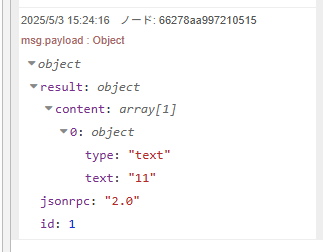
このように MCP サーバーから結果が返ってきます!
ステートレスで一旦疎通できると MCP サーバーと MCP クライアントの挙動があっていることが分かり、あとは HTTP ストリーミング+セッションが絡むステートフルをつなげればよくなります。
ちょうどよい踊り場としての検証になりました。