p5.js の複雑めのアニメーション公式サンプル Flocking を obniz ディスプレイで動かすメモ
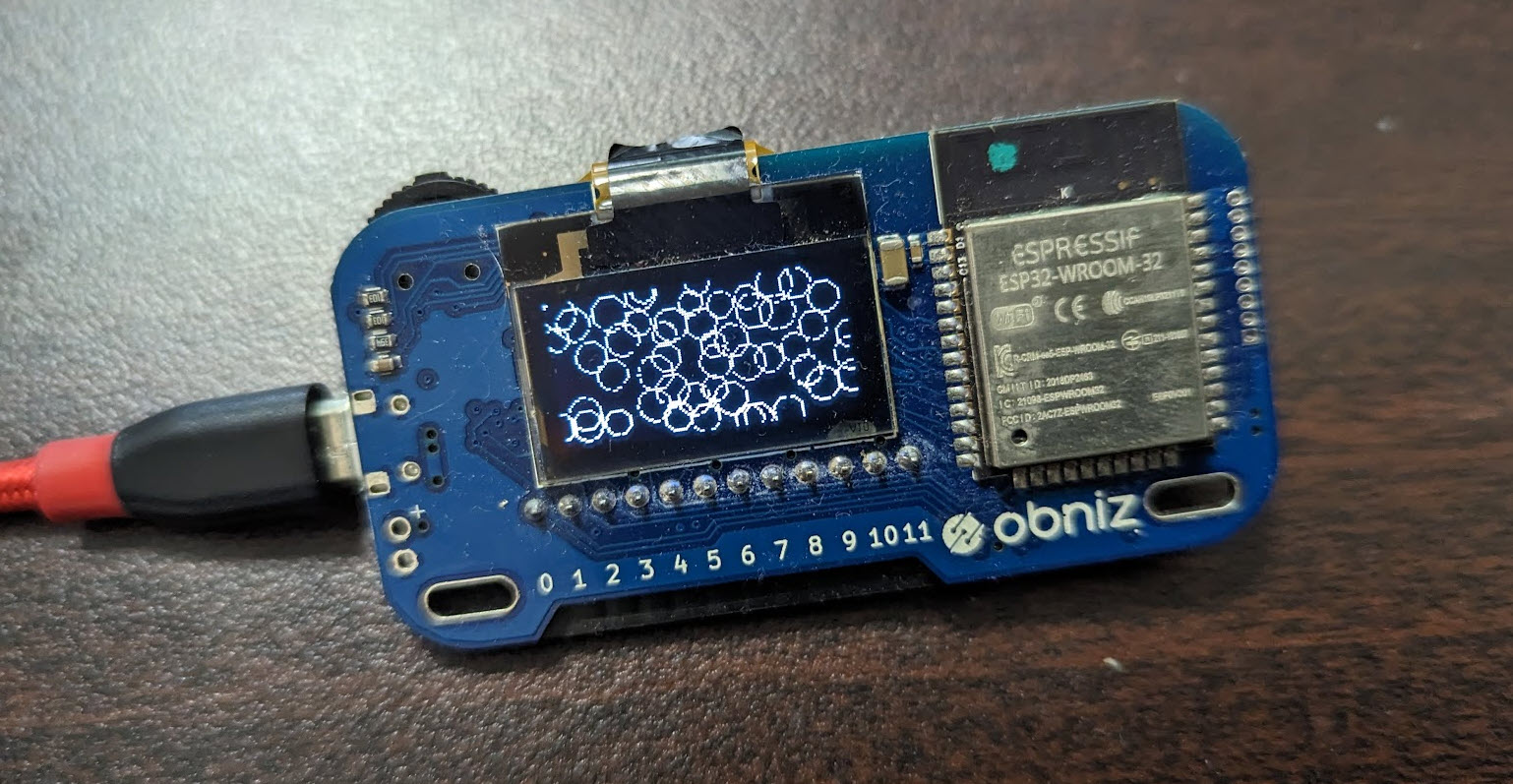
p5.js の複雑めのアニメーション公式サンプル Flocking を obniz ディスプレイで動かすメモです。
このように動きます
p5.js の複雑めのアニメーション公式サンプル Flocking を、白黒に調整・少しサイズランダムで泡っぽく、fps 10 、obniz Board の画面サイズ 128x64 で動くように調整してみたら、ディスプレイにうまく泡がフワフワできたー。割と動く。白黒二値表示、癒されるー。 #obniz #p5js pic.twitter.com/3K0z5CrqrC
— Tanaka Seigo (@1ft_seabass) March 29, 2023
動作環境
- Windows 10
- Chrome ブラウザから obniz クラウドで実行
プログラム
https://www.1ft-seabass.jp/memo/2023/03/29/p5js-obniz-display-collaboration/
p5.js の複雑めのアニメーション公式サンプル Flocking をベースに、p5.js の canvas の動きをobniz ディスプレイで動かしたこちらのナレッジを活用していきます。
実際に出来上がったプログラムがこちらです。
<html>

<head>
  <meta charset="utf-8" />
  <meta name="viewport" content="width=device-width, initial-scale=1" />
  <link rel="stylesheet" href="https://stackpath.bootstrapcdn.com/bootstrap/4.3.1/css/bootstrap.min.css" />
  <script src="https://obniz.io/js/jquery-3.2.1.min.js"></script>
  <script src="https://unpkg.com/obniz@3.25.0/obniz.js" crossorigin="anonymous"></script>
  <script src="https://cdnjs.cloudflare.com/ajax/libs/p5.js/1.6.0/p5.min.js" integrity="sha512-3RlxD1bW34eFKPwj9gUXEWtdSMC59QqIqHnD8O/NoTwSJhgxRizdcFVQhUMFyTp5RwLTDL0Lbcqtl8b7bFAzog==" crossorigin="anonymous" referrerpolicy="no-referrer"></script>
</head>

<body>
  <script>

    let cnv;

    // https://p5js.org/examples/hello-p5-flocking.html
    // ラインがループするサンプルを改造

    let boids = [];

    function setup() {
      cnv = createCanvas(128, 64);

      frameRate(10);

      // Add an initial set of boids into the system
      for (let i = 0; i < 50; i++) {
        boids[i] = new Boid(random(width), random(height));
      }
    }

    function draw() {
      background(0);
      // Run all the boids
      for (let i = 0; i < boids.length; i++) {
        boids[i].run(boids);
      }
    }

    // Boid class
    // Methods for Separation, Cohesion, Alignment added
    class Boid {
      constructor(x, y) {
        this.acceleration = createVector(0, 0);
        this.velocity = p5.Vector.random2D();
        this.position = createVector(x, y);
        this.r = 0.5;
        this.maxspeed = 5;    // Maximum speed
        this.maxforce = 0.05; // Maximum steering force
      }

      run(boids) {
        this.flock(boids);
        this.update();
        this.borders();
        this.render();
      }

      // Forces go into acceleration
      applyForce(force) {
        this.acceleration.add(force);
      }

      // We accumulate a new acceleration each time based on three rules
      flock(boids) {
        let sep = this.separate(boids); // Separation
        let ali = this.align(boids);    // Alignment
        let coh = this.cohesion(boids); // Cohesion
        // Arbitrarily weight these forces
        sep.mult(2.5);
        ali.mult(1.0);
        coh.mult(1.0);
        // Add the force vectors to acceleration
        this.applyForce(sep);
        this.applyForce(ali);
        this.applyForce(coh);
      }

      // Method to update location
      update() {
        // Update velocity
        this.velocity.add(this.acceleration);
        // Limit speed
        this.velocity.limit(this.maxspeed);
        this.position.add(this.velocity);
        // Reset acceleration to 0 each cycle
        this.acceleration.mult(0);
      }

      // A method that calculates and applies a steering force towards a target
      // STEER = DESIRED MINUS VELOCITY
      seek(target) {
        let desired = p5.Vector.sub(target, this.position); // A vector pointing from the location to the target
        // Normalize desired and scale to maximum speed
        desired.normalize();
        desired.mult(this.maxspeed);
        // Steering = Desired minus Velocity
        let steer = p5.Vector.sub(desired, this.velocity);
        steer.limit(this.maxforce); // Limit to maximum steering force
        return steer;
      }

      // Draw boid as a circle
      render() {
        fill(0, 0);
        stroke(500);
        const size = 10 + Math.floor(Math.random() * 6);
        ellipse(this.position.x, this.position.y, size, size);
      }

      // Wraparound
      borders() {
        if (this.position.x < -this.r) this.position.x = width + this.r;
        if (this.position.y < -this.r) this.position.y = height + this.r;
        if (this.position.x > width + this.r) this.position.x = -this.r;
        if (this.position.y > height + this.r) this.position.y = -this.r;
      }

      // Separation
      // Method checks for nearby boids and steers away
      separate(boids) {
        let desiredseparation = 25.0;
        let steer = createVector(0, 0);
        let count = 0;
        // For every boid in the system, check if it's too close
        for (let i = 0; i < boids.length; i++) {
          let d = p5.Vector.dist(this.position, boids[i].position);
          // If the distance is greater than 0 and less than an arbitrary amount (0 when you are yourself)
          if ((d > 0) && (d < desiredseparation)) {
            // Calculate vector pointing away from neighbor
            let diff = p5.Vector.sub(this.position, boids[i].position);
            diff.normalize();
            diff.div(d); // Weight by distance
            steer.add(diff);
            count++; // Keep track of how many
          }
        }
        // Average -- divide by how many
        if (count > 0) {
          steer.div(count);
        }

        // As long as the vector is greater than 0
        if (steer.mag() > 0) {
          // Implement Reynolds: Steering = Desired - Velocity
          steer.normalize();
          steer.mult(this.maxspeed);
          steer.sub(this.velocity);
          steer.limit(this.maxforce);
        }
        return steer;
      }

      // Alignment
      // For every nearby boid in the system, calculate the average velocity
      align(boids) {
        let neighbordist = 50;
        let sum = createVector(0, 0);
        let count = 0;
        for (let i = 0; i < boids.length; i++) {
          let d = p5.Vector.dist(this.position, boids[i].position);
          if ((d > 0) && (d < neighbordist)) {
            sum.add(boids[i].velocity);
            count++;
          }
        }
        if (count > 0) {
          sum.div(count);
          sum.normalize();
          sum.mult(this.maxspeed);
          let steer = p5.Vector.sub(sum, this.velocity);
          steer.limit(this.maxforce);
          return steer;
        } else {
          return createVector(0, 0);
        }
      }

      // Cohesion
      // For the average location (i.e. center) of all nearby boids, calculate steering vector towards that location
      cohesion(boids) {
        let neighbordist = 50;
        let sum = createVector(0, 0); // Start with empty vector to accumulate all locations
        let count = 0;
        for (let i = 0; i < boids.length; i++) {
          let d = p5.Vector.dist(this.position, boids[i].position);
          if ((d > 0) && (d < neighbordist)) {
            sum.add(boids[i].position); // Add location
            count++;
          }
        }
        if (count > 0) {
          sum.div(count);
          return this.seek(sum); // Steer towards the location
        } else {
          return createVector(0, 0);
        }
      }
    }


    // 今回の obniz を指示するための設定
    const obniz = new Obniz("OBNIZ_ID_HERE");

    obniz.onconnect = async function () {
      obniz.display.clear();
      obniz.display.print("p5.js");

      console.log(cnv);

      obniz.onloop = async function(){
        // この形で canvas の getContext('2d') 的な値を渡せる
        const ctx = cnv.drawingContext;
        obniz.display.draw(ctx);
      }

    }
  </script>
</body>

</html>
対応としては、そんなに多くなく以下の通りです。
function setup() {
      cnv = createCanvas(128, 64);

      frameRate(10);
setup のところで、fps 10 、obniz Board の画面サイズ 128 * 64 の対応をしています。
// Add an initial set of boids into the system
      for (let i = 0; i < 50; i++) {
        boids[i] = new Boid(random(width), random(height));
      }
泡の出る量を 100 から 50 に変更しました。
function draw() {
      background(0);
背景をグレーから真っ黒にして白黒を鮮明に。
constructor(x, y) {
        this.acceleration = createVector(0, 0);
        this.velocity = p5.Vector.random2D();
        this.position = createVector(x, y);
        this.r = 0.5;
        this.maxspeed = 5;    // Maximum speed
        this.maxforce = 0.05; // Maximum steering force
      }
this.r で円の大きさを 3.0 から 0.5 にしてディスプレイに収まりやすいよう小さめに。this.maxspeed を 3 から 5 にして少し早めに動くように。
// Draw boid as a circle
      render() {
        fill(0, 0);
        stroke(500);
        const size = 10 + Math.floor(Math.random() * 6);
render のところで fill を調整して127,127 から 0,0 にしてより白黒に調整。stroke は 200 から 500 にして線を太めに出しました。const size のところで、少しサイズランダムをいれて泡っぽくしています。
実際の実行中の PC ブラウザでの動きと #obniz でのディスプレイの動きはこんな感じです。割と同期してるー。 #p5js pic.twitter.com/lxalChN6fW
— Tanaka Seigo (@1ft_seabass) March 29, 2023
fps10 くらいでも、PC で描画されている雰囲気とかなり近い形で動きますね。ありがたいです。