Node-RED を別ポート・別フローで個別実行する処理を package.json の npm run コマンドでまとめたメモ

Node-RED を別ポート・別フローで個別実行する処理を package.json の npm run コマンドでまとめたメモです。
Node-RED を別ポート・別フローで個別実行したいときに行っている設定 をまとめてみましたが、package.json の npm run コマンドにさらにまとめてみました。
https://www.1ft-seabass.jp/memo/2021/04/15/node-red-per-launch-project-setting/
package.json ファイル
どこかで作業したいフォルダを作ったあと、その中に以下の内容で package.json ファイルをつくります。
{
  "name": "sample",
  "version": "1.0.0",
  "description": "",
  "main": "index.js",
  "scripts": {
    "node-red": "node-red -p 18801 -u ./node-red_dir -s ./node-red_dir/settings.js",
    "init":"npm run init:mkdir && npm run init:get-settings.js",
    "init:mkdir":"node -e \"console.log('[START] mkdir-node-red_dir');const fs = require('fs');const path_nodered_dir = './node-red_dir';if (fs.existsSync(path_nodered_dir)) {console.log( '[ALERT] ' + path_nodered_dir + ' has existed!');} else {console.log('[OK] mkdir -> ' + path_nodered_dir );fs.mkdirSync(path_nodered_dir);}\"",
    "init:get-settings.js": "node -e \"const url = 'https://raw.githubusercontent.com/node-red/node-red/master/packages/node_modules/node-red/settings.js';const stream_output_path = './node-red_dir/settings.js';if (fs.existsSync(stream_output_path)) {console.log( '[ALERT] ' + stream_output_path + ' has existed!');} else {console.log('[START] download settings.js ...');const https = require('https');const fs = require('fs');const stream = fs.createWriteStream(stream_output_path);https.get(url, function(res){res.pipe(stream);res.on('end', function () {stream.close();console.log('[OK] got settings.js! -> ' + stream_output_path);});});}\""
  },
  "keywords": [],
  "author": "",
  "license": "MIT"
}
保存した後に、ターミナルで
npm run initとコマンドを実行してやれば
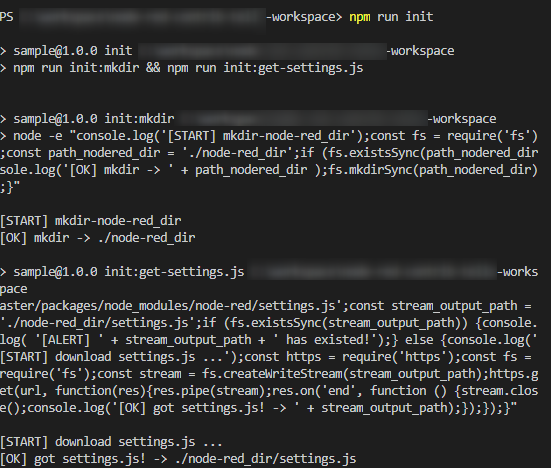
と、コマンドが走って前回の記事で説明した手順の「node-red_dirフォルダの作成」と「settings.jsのダウンロード」を替わりに行ってくれます。
ワンライナー化する前のコード
ワンライナー化は以下のナレッジをベースに対応しました。
https://www.1ft-seabass.jp/memo/2021/04/13/vscode-regexp-convert-one-liner/
node-red_dir フォルダの作成するワンライナー化する前のコードは以下の通りです。
console.log('[START] mkdir-node-red_dir');
const fs = require('fs');
const path_nodered_dir = './node-red_dir';
if (fs.existsSync(path_nodered_dir)) {
  console.log( '[ALERT] ' + path_nodered_dir + ' has existed!');
} else {
  console.log('[OK] mkdir -> ' + path_nodered_dir );
  fs.mkdirSync(path_nodered_dir);
}
settings.js のダウンロードするワンライナー化する前のコードは以下の通りです。
const url = 'https://raw.githubusercontent.com/node-red/node-red/master/packages/node_modules/node-red/settings.js';
const stream_output_path = './node-red_dir/settings.js';

if (fs.existsSync(stream_output_path)) {
  console.log( '[ALERT] ' + stream_output_path + ' has existed!');
} else {
  console.log('[START] download settings.js ...');
  const https = require('https');
  const fs = require('fs');
  const stream = fs.createWriteStream(stream_output_path);
  https.get(url, function(res){
    res.pipe(stream);
    res.on('end', function () {
      stream.close();
      console.log('[OK] got settings.js! -> ' + stream_output_path);
    });
  });
}
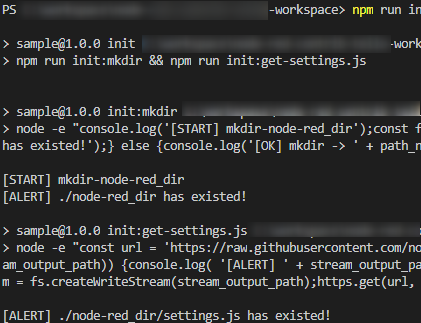
うっかり2度実行しても大丈夫
実際に、私がうっかり2度実行したことがあり、予防処置をしています。
このように、ファイルやフォルダが存在してたら、上書きしません。もし、再度やり直す場合は node-red_dir フォルダを削除して、再度コマンドを実行しましょう。