自分のブログの WordPress REST API で JP Markdown で編集している素の Markdown データを取得するメモ

自分のブログの WordPress REST API で JP Markdown で編集している素の Markdown データを取得するメモです。
通常の記事を取得する
この場合は、以下の記事がとっても助かりました。
ただし、こちらを使っても、JP Markdown でJP Markdown で記事作成している素の Markdown データがありません。
データベースを直接見てみると post_content_filtered という記述で指定してあげるとちゃんと取得できるようです。このあたりを参考にしました。→ 関数リファレンス/wp insert post - WordPress Codex 日本語版
ということで取得できるようにする
外観 > テーマエディタ から functions.php の中に追記します。
function get_post_datas($post) {
	$current_tags = get_the_tags($post->ID);
	$current_tags_name = array();
	foreach($current_tags as $tag) {
	  array_push($current_tags_name, $tag -> name);
	}
    $result = array(
      'ID' => $post->ID,
      'thumbnail' => get_the_post_thumbnail_url($post->ID, 'full'),
      'slug' => $post->post_name,
      'date' => $post->post_date,
      'modified' => $post->post_modified,
      'title' => $post->post_title,
      'excerpt' => $post->post_excerpt,
      'content' => $post->post_content,
      'post_content_filtered' => $post->post_content_filtered,
      'tags' => $current_tags_name
    );

	return $result;
}

function add_rest_endpoint_all_posts_from_blog() {
  register_rest_route(
    'api/sample',
    '/test',
    array(
      'methods' => 'GET',
      'callback' => 'get_all_posts_from_blog'
    )
  );
}

function get_all_posts_from_blog() {
  $args = array(
    'post_status' => 'publish',
    'posts_per_page' => $_REQUEST['posts_per_page'],
	'offset' => $_REQUEST['offset']
  );
  $all_posts = get_posts($args);
  $result = array();
  foreach($all_posts as $post) {
    $data = get_post_datas($post);
    array_push($result, $data);
  };
  return $result;
}
add_action('rest_api_init', 'add_rest_endpoint_all_posts_from_blog');
このように追記しました。 register_rest_route の関数で 'api/sample' や test と指定されているところは自分の取得したい独自APIのアドレスで指定します。
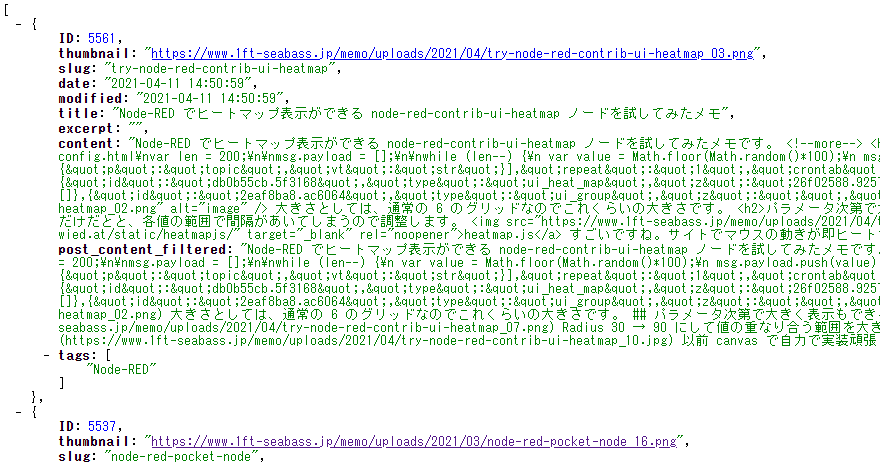
この API で実装がうまく行くと、以下のように post_content_filtered に、今まで書いていた Markdown 記述が入っています。
この API があれば、記事データをどこかに保管しておきたいときに活用していけそうです。